R_keeper Cloud manual
Examples of files and folders on the server:
MSSQL Server – one instance for all the clients of the virtual machine (VM)
Common Server – one instance for all the clients of the VM
Sdbsrv64 assistent – SH5 service, one instance for all the clients of the VM
D:\COMMONSRV - Common Server
D:\MSSQLDB - MSSQL data and log files
D:\RK7DATA\XXXXXXXXX* - clients' instance folders (where *XXXXXXXXX is for the restaurant code)
Each D:\RK7DATA\XXXXXXXXX folder contains:
- FeatureServer - the interactive reporting service
- Rk7Reference - RK7 reference server
- Rk7Reference\base - RK7 database
- Rk7Manager - RK7 manager
- Logs - reference server logs
D:\SH5SRV - Sdba64.exe и SdbSrv64.exe – SH5 executable files (common for all the clients of the VM)
D:\SH5SRV\ShLib - different versions of SH5 libraries,
for example: d:\SH5SRV\ShLib5.103.353.3\shcrtdb64.dll, shsrv64.dll и shcrtdb.ini
You can set a specific version of the library for each instance while installing or updating SH5. The library path is defined in the registry.
D:\SH5SRV\QushSrv - QUSHSVC service
D:\SH5DATA\XXXXXXXXX - SH5 database, backups and logs (where *XXXXXXXXX is for the restaurant code)
- D:\SH5DATA\XXXXXXXXX\Backup - backups
- D:\SH5DATA\XXXXXXXXX\Database\SH5DB_XXXXXXXXX - data file
- D:\SH5DATA\XXXXXXXXX\Database\SH5DBLog_XXXXXXXXX - transactions log file
- D:\SH5DATA\XXXXXXXXX\Log\SH5.log - SH5 service log
Setting up the VM
1. Install MSSQL Server (one instance for the VM) - once for each VM.
2. Install Common Server (one instance for the VM) - once for each VM.
Find the installer on r_keeper FTP server: ftp://ftp.ucs.ru/rk7/other/UCS_CS/CSSetup.exe
3. Install Sdbsrv64 assistent (one instance for the VM). You may use Sdbsetup.exe utility from r_keeper FTP server:
ftp://ftp.ucs.ru/StoreHouse%205/_utils/_sdbsetup/Sdbsetup.7z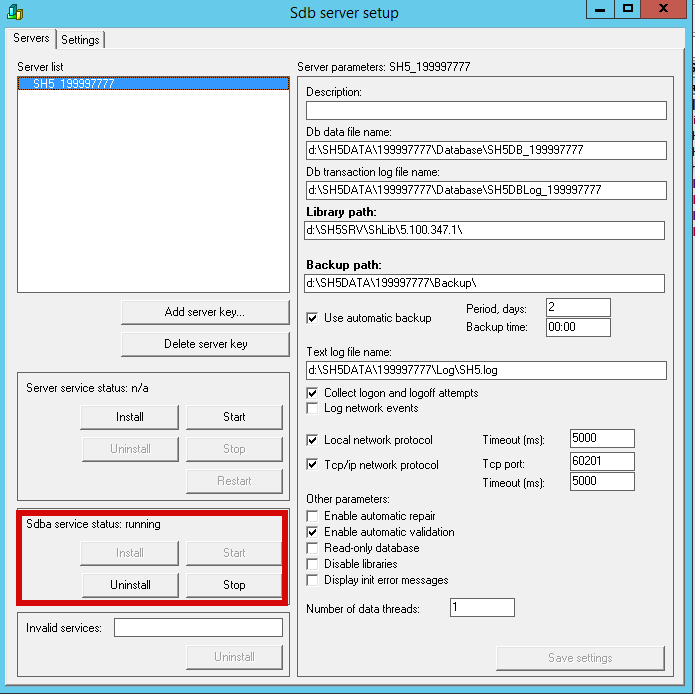
4. Create SH5 registry branches and keys.
A .reg file should contain:
Windows Registry Editor Version 5.00
[HKEY_LOCAL_MACHINE\SOFTWARE\UCS\Sdbserv.2]
"QushSrvDir"="d:\\SH5SRV\\QushSrv\\"
"SdbsPath"="D:\\SH5SRV\\sdbsrv64.exe"
"SdbaPath"="D:\\SH5SRV\\sdba64.exe"
"ShlibDir"="D:\\SH5SRV\\ShLib"
"DbDir"="D:\\SH5SRV"
"BkpDir"="D:\\SH5SRV"
[HKEY_LOCAL_MACHINE\SOFTWARE\Wow6432Node\UCS\Qush\]Installing software suite for the client
Let's consider the example of object No199997777
- Create an empty SQL database for RK7:
- SQLCMD.EXE -S 127.0.0.1 -U username -P passwd -Q "CREATE DATABASE RK7_199997777"
- Start RK7 and FS installation in silent mode:
- RK7_Setup_7.6.5.412.2.exe /SILENT /INIFILE="rk7inst.ini"
A detailed example of rk7inst.ini content is be given below
- Start the Reference server by using RefSrv.exe/desktop command. Click «Yes» to create a new database or choose an already created one.
- Start rk7man and adjust basic settings.
- Here is a detailed instruction
- Having adjusted the settings and performed the export to the external database, stop the Reference server and start it as a service. To do it, you may:
- double-click Refsrv.exe and follow the instructions, or
- create the server shortcut adding /install to the file path of the shortcut properties.
- Start UCS Feature Server (FS). When started for the first time FS creates all the necessary tables in the database.
- Install SH5 using Shdbinst.exe utility:
7.1 - Create the necessary registry keys
Let's consider the examples of PowerShell commands:
# Enter the code of the restaurant
$rest = 199997777
# Create the registry branch for the restaurant
New-Item -Path HKLM:\SOFTWARE\ucs\sdbserv.2\_$rest
$path = "HKLM:\SOFTWARE\ucs\sdbserv.2\SH5_$rest"
# You should have a folder with SH5 libraries. Define the path to this folder. There should be a folder named as a version number with corresponding libraries.
New-ItemProperty -PropertyType String -Path $path -name libpath -Value "d:\SRV\ShLib\5.100.347.1\"
# A backup path
New-ItemProperty -PropertyType String -Path $path -name bkppath -Value "d:\SH5DATA{color}$rest\Backup\"
# A server log path
New-ItemProperty -PropertyType String -Path $path -name logfile -Value "d:\DATA{color}$rest\Log\SH5.log"
# Backup creation time is 00:00, once a day (in the given case)
New-ItemProperty -PropertyType DWord -Path $path -name bkpprms -Value "00000001"
# Port 60201 of server
New-ItemProperty -PropertyType DWord -Path $path -name np1p -Value 60201
# Server connection timeout is 5000ms
New-ItemProperty -PropertyType DWord -Path $path -name np1t -Value "5000"
New-ItemProperty -PropertyType DWord -Path $path -name np0t -Value "5000"
# Server parameters. In the given case, only automated database testing is enabled.
New-ItemProperty -PropertyType DWord -Path $path -name params -Value "00000000"
7.2 – Execute the command to create SH5 service
New-Service -BinaryPathName "d:\SH5SRV\SdbSrv64.exe /s /nSH5_$rest" -Name "Sdbsrv64: SH5_$rest" -DisplayName "Sdbsrv64: SH5_$rest" -StartupType Automatic
7.3 – Execute the command to create SH5 database
# /s<Server_Name> - SH5 server name for client connecting
$s = "SH5_" + $rest
#/f<Database_File_Name> - the name of the database file (may contain the pathname)
$f= "d:\SH5DATA\" + $rest + "\Database\SH5DB_" + $rest
#/i<Database_Size> - the size of the new database (MB)
$i= "22"
#/t<Transaction_Log_Name> - the name of the transaction log file (may contain the pathname)
$t = "d:\SH5DATA\" + $rest + "\Database\SH5DBLog_" + $rest
#/a<Administrator_Name> - the name of the database administrator
$a = "Admin"
#/p<Administrator_Password> - the password of the database administrator (empty by default)
$p = $pass
#/l<Controlling_Library_Path> - the path to the shcrtdb64.dll library (used for database creating/updating)
$l = "d:\SH5SRV\ShLib\5.100.347.1\shcrtdb64.dll"
Start-Process -FilePath d:\SH5-Admin\Shdbinst\Shdbinst.exe -ArgumentList "/s$s /f$f /i$i /t$t /a$a /p$p /l$l" -Wait
7.4 – Install the linked QUSH SVC
Authorization takes place at SH5 server
# Create the registry keys for QUSH SVC
New-Item -Path "HKLM:\SOFTWARE\Wow6432Node\UCS\Qush@SH5_$rest@"
$path = "HKLM:\SOFTWARE\Wow6432Node\UCS\Qush@SH5_$rest@"
# Linked SH5 server connection settings
New-ItemProperty -PropertyType String -Path $path -name SH5Link -Value "127.0.0.1:60201"
New-ItemProperty -PropertyType String -Path $path -name Union -Value "1"
# The service description
New-ItemProperty -PropertyType String -Path $path -name Descr -Value "SH5_$rest"
# The executable file path
New-ItemProperty -PropertyType String -Path $path -name ExePath -Value "D:\\SH5SRV\\QushSrv
QushSvc.exe"
# QUSH SVC port
New-ItemProperty -PropertyType DWord -Path $path -name Port -Value 8201
# QUSH SVC installation
Start-Process -FilePath d:\SH5SRV\QushSrv\QushSvc.exe -ArgumentList "/Name:@SH5_$rest@ /Port:8201 /Install /Silent" -Wait
# QUSH SVC start
Start-Service ('@SH5_' + $rest + '@')
As a result, there will be a set of services for the restaurant:
Common services (one instance for all the clients):
- CS_CS_MAIN - UCS Common Server – common for all the clients
- Sdbsrv64 assistent – SH5 service
- MSSQL
Services, personalized for each restaurant
Let's consider the example of object No199997777:
QushSvc: @SH5_199997777@
FS_IR_199997777
RKeeper 7 References Server (199997777)
Sdbsrv64: SH5_199997777
The example of rk7srv.ini
[REFSERVER]
MainLang=.\localize\rkeeper7\rkeeper7.ru.xlf
UseSQL=1
ERRORLOG=..\LOGS\refsrv.stk
Server=RK7SRV_199997777
UDBFILE=.\base\rk7.udb
WorkModules=.\base\workmods
UseNetChecking=1
LicServerIP=l.ucs.ru:60607
;to start/to stop cube recalculation, 0 - to stop recalculation
CubesRecalc = 0
[NETKERN]
Protocols=tcpsoc.dll
[TCPSOC]
PORT=50201The example of rk7inst.ini
;installation settings
[INSTALL]
;instance name
INSTANCENAME=199997777
;installation path
DIRTOINSTALL=D:\RK7DATA\
;components
;1 - to install, 0 - not to install
[COMPONENTS]
;reference server
REFSRV=1
;sql database
REFSQL=0
;manager station
MAN=1
;report plugin
PLUGIN=1
;report server
REPORTSRV=0
;report feature server
FEATURE=1
;common server
COMMON=0
;Timekeeper (TK) client
TKCLIENT=0
;TK feature server
TKFEATURE=0
;TK2 server (TKA)
TKA=0
;to install or not FRVCLGenerate as service
FRVCLGEN = 0
;to install or not to install FSupdate.exe
FSUPDATE = 0
;reference server parameters
[REFSRV]
;network name
NAME=RK7SRV_199997777
;address
;should be defined, if reference server is not installed
IP=127.0.0.1
;port
PORT=50201
;service
;1 - server is installed as service, 0 - installed as application
SERVICE=1
;desktop shortcut
;1 - yes, 0 - no
SHORTCUT=0
;report server parameters
[MAN]
SHORTCUT=0
[REPORTSRV]
;network name
NAME=TESTREPS
;port
PORT=50701
;service
;1 - server is installed as service, 0 - installed as application
SERVICE=1
;desktop shortcut
;1 - yes, 0 - no
SHORTCUT=0
;feature server parameters
[FEATURE]
;external address (ip or host)
IP=127.0.0.1
;port
PORT=9501
;external port
EXPPORT=9501
;localization file (ENG or RUS)
;0-ENG, 1-RUS
LOCALIZE=1
;replication server address
REPLICAIP=127.0.0.1
;replication server external port
REPLICAEXPPORT=9801
;replication server port
REPLICAPORT=9801
;dictionary editing
;1-yes, 0-no
DICTIONARYEDIT=1
;mailing
;1-yes, 0- no
MAILING=1
;service
;1 - the server is installed as service, 0 - installed as application
SERVICE=1
;desktop shortcut
;1 - yes, 0 - no
SHORTCUT=0
;common server parameters
[COMMON]
;https port
HTTPSPORT=7008
;http port
HTTPPORT=7007
;path to ssl certificate folder
;is defined if you use your own certificates
;if not, certificates will be generated automatically
CERTIFICATEPATH=
;a root ssl certificate file
;is defined if you use your own certificates
;if not, the file will be generated automatically
ROOTCERT=
;ssl certificate file  ;is defined if you use your own certificates
;if not, the file will be generated automatically
CERTFILE=
;ssl key file  ;is defined if you use your own certificates
;if not, the file will be generated automatically
KEYFILE=
;logging level
;0 - only critical messages, 1 - minimal logging, 2 - all messages in the minimized form
;3 - all messages in the expanded form, 4 - debug log + LogSQLTime
LOGLEVEL=3
;a service
;1 - server is installed as service, 0 - installed as application
SERVICE=1
;desktop shortcut
;1 - yes, 0 - no
SHORTCUT=0
;parameters of the previously installed common server
;are defined if report plugin is installed and report feature server is not
[OLDCOMMON]
;address
IP=127.0.0.1
;port PORT=7007
;feature server guid
FSGUID=
;TK parameters
[TIMEKEEPER]
;TK feature address
TKFEATUREIP=127.0.0.1
;TK feature port
TKFEATUREPORT=8884
;TK client installation path
;is defined if client is installed and the manager station is not
TKCLIENTPATH=
;TK feature service
;1 - server is installed as service, 0 - installed as application
TKFEATURESERVICE=1
;TK2 service
;1 - server is installed as service, 0 - installed as application
TKASERVICE=1
;desktop shortcuts
;1 - yes, 0 - no
TKFEATURESHORTCUT=1
TKASHORTCUT=1
;ms sql server
;settings are configured if reference server sql database, report feature server and TK feature server are installed
;only MS SQl Server 2012 is allowed
;TCP should be enabled, ports should be defined
[MSSQLSERVER]
;address
IP=127.0.0.1
;port
PORT=1433
;login
LOGIN=sa
;password
PASS=passwd
;database name
;if ms sql database is selected for installation, you have to set the name for new database
;if ms sql database is not selected for installation, while report function server or TK feature server is, you should set the name of existing database
DBNAME=RK7_199997777